A domain's DNS (its address book) is kept by one service, named by the domain's name servers. For a domain registered with 7x you choose which one on the domain's page, under Where your DNS lives.
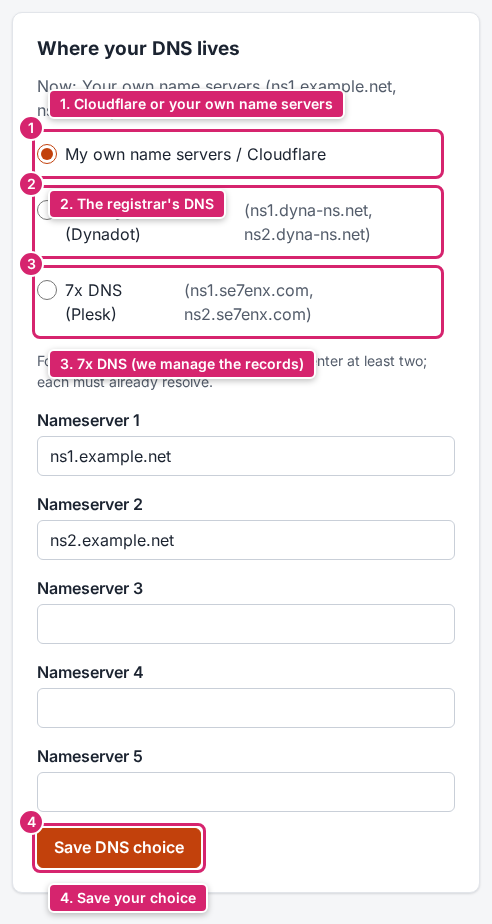
The three choices
| Choice | Who changes the records | Good for |
|---|---|---|
| 7x DNS (Plesk) | 7x: we set the records for your site and e-mail; ask in a ticket for any change. | The simplest choice: everything at 7x, nothing to do yourself. |
| The registrar's DNS | 7x, at the registrar, on request. | Domains that only point at one site and change rarely. |
| My own name servers / Cloudflare | You, at Cloudflare or your own DNS provider. Enter at least two name servers (up to five); each must already work. | People who already use Cloudflare, or need many records of their own (Google Workspace, Microsoft 365, other services). |
Switching
- Open Domains and click the domain.
- Under Where your DNS lives, choose one of the three.
- For your own name servers or Cloudflare, enter them under Nameserver 1 to Nameserver 5.
- Click Save DNS choice.
The change reaches everyone within a few hours. The page says which choice is active now, and DNS records shows what was found at the last check.
Important
Before you switch, make sure the new place has all records: the A records of your site and the MX and TXT records of your e-mail. Otherwise your site or e-mail stops working. Moving to 7x DNS? We copy them for you; ask in a ticket.
Using Cloudflare? See Using Cloudflare with 7x for the right settings.