Ordering takes about five minutes. You need an e-mail address you can open, and a payment card (not for a free trial). Already a customer? Use Order more in the console instead (see below).
Before you begin
Decide which plan you want. If you are not sure, read Which hosting plan is right for you? first.
Steps
- Go to the hosting page and click Order on the plan you want.
- Create your account: enter your name, a user name, your e-mail address and a password, and accept the terms.
- Open the e-mail we send you and click the link in it to confirm your address.
- Enter your details: name, company (if any), country and billing address.
- Enter the domain name your site will use, for example
yourbusiness.com. If you don't have one yet, you can register one in the same order. - Check the order summary and click Continue to payment.
- Enter your card and pay. Tick Save the card for renewals if you want future invoices paid automatically.
Result
Your account home shows Your site is being set up. Within the hour the hosting account is created, your website platform is installed (Exponential 6 unless you chose otherwise) and the first backup is made. You get an e-mail when your site is live.
What to do next
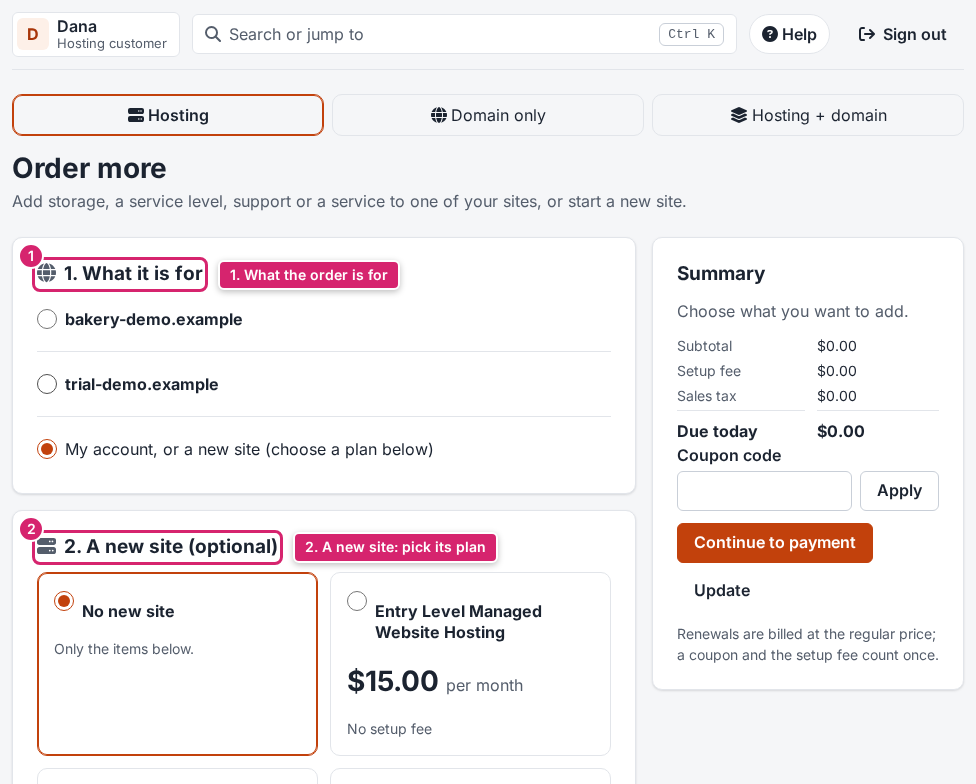
Already a customer: Order more. In the console click Order more (on the Home page or in the menu). Choose what the order is for (one of your sites, or a new site), pick a plan or an add-on, then continue to payment. With a saved card or enough account credit, Pay now finishes it in one click.
Next: point your domain at your 7x site, so visitors reach it. The SSL certificate is issued automatically once it does.
If something goes wrong
- No confirmation e-mail after 10 minutes? Look in your spam folder, then use Send the link again on the sign-up page.
- The payment was declined? Check the card number and the billing address, or try another card. Nothing is charged for a declined payment.
- An account that is never confirmed is deleted after 7 days. Just sign up again.